Back
Job Tracking, Gear Rentals, and Invoicing for Key Grips
You already know how to run a grip department.
Keeping track of holds, payroll, gear rentals, subrentals, expendables, mileage, and invoices is a different job.
Slater gives working Key Grips one place to manage the business side of freelance film work, from the first text about a job through the final invoice.
Run your freelance key grip career in Slater.
Manage your jobs, gear, and invoices all in one place
Track your holds, hours, gear packages, subrentals, and invoices without bouncing between five different tools.
How Key Grips Get Paid
There is no single way Key Grips get paid.
On many productions, your labor goes through payroll. Commercials and shorter jobs may use a payroll platform like Wrapbook, while television and feature work may run through Entertainment Partners, GreenSlate, Cast & Crew, or another production payroll company.
Other jobs may ask you to invoice your labor directly.
Then there is your gear.
If you are bringing a grip truck, rigging equipment, carts, specialty gear, or another equipment package, that rental is usually handled separately from your labor.
One Key Grip job might involve:
Labor paid through payroll
A separate grip truck or equipment invoice
Additional gear added during the job
Subrentals from other owner-operators or rental houses
Expendables billed back to production
Mileage
Travel days
Per diem
Other negotiated expenses
The job itself is usually easy to remember.
Keeping all of the money connected to it is where things start falling through the cracks.
Key Grip Day Rates and Labor
Key Grip labor may be paid as a day rate, an hourly rate with a guaranteed number of hours, or under a negotiated weekly deal.
There is no universal Key Grip rate.
Your rate can change depending on:
Production type
Budget
Union agreement
Market
Length of the job
Your experience
The deal you negotiate
Commercial work will often pay a higher rate per day than long-form work because television and feature jobs typically offer more consecutive days of employment.
A one-day commercial and a twelve-week feature are very different deals.
What about overtime?
Many Key Grip deals include a guaranteed number of hours before additional overtime applies.
Rather than trying to reconstruct a day later, keep accurate in and out times for every job.
Your timecard or labor invoice should reflect the deal you made with production.
Need help calculating your day?
Calculate your film set pay and overtime →
Grip Truck and Equipment Package Rentals
Your labor rate and your equipment rate are two separate parts of the job.
If you are supplying a grip truck or equipment package, that package is usually negotiated independently from your Key Grip labor.
Grip packages are often billed by the day, with discounted multi-day or weekly rates negotiated when production needs the equipment for a longer period.
A deal might look something like:
1 shoot day: Full daily package rate
3 shoot days: Negotiated three-day weekly package rate
Long-form production: Negotiated weekly package rate
Those are deal structures, not rules.
You can negotiate whatever makes sense for your equipment, market, production, and how long your gear will be tied up.
Box Rental vs. Gear Rental
You will sometimes hear the terms box rental and kit rental used interchangeably.
A box or kit rental is generally a payment production makes to a crew member for the personal tools and equipment they bring to the job.
For a Key Grip bringing personal tools or a rigging cart, a box rental may make sense.
If you are supplying a full grip truck or larger equipment package, you are more likely to negotiate the package itself instead of adding a separate box rental on top of it.
The important part is agreeing on what production is actually renting from you before the job starts.
What Should Be on a Key Grip Equipment Invoice?
Your equipment invoice should make it easy for production to understand what they rented and what they owe.
At minimum, include:
Your name or business name
Production company
Project name
Invoice number
Shoot dates or rental period
Equipment or package description
Number of rental days
Agreed rental rate
Additional equipment
Expendables, when applicable
Sales tax, when applicable
Payment terms
Total amount due
If your labor is also being invoiced, it can often be cleaner to send a separate labor invoice instead of combining everything onto one invoice.
Production may want labor and equipment processed differently, even though both came from the same job.
Key Grip Equipment Invoice Example
Here is a simple example for a two-day commercial.
Production Company: Blue Robin Productions
Project: Hoop and Harry
Rental Period: October 12–13
Payment Terms: Net 30
Equipment Invoice

These rates are examples only. Actual Key Grip labor and equipment rates vary by production, location, equipment, agreement, and negotiation.
Subrentals Are Easy to Forget
Key Grips subrent equipment all the time.
Maybe another grip owns the slider you need.
Maybe you need a Max Menace for two days.
Maybe your truck is short on 20x20 solids.
Maybe production adds a specialty rig that does not make sense for you to own.
You may subrent from:
Other Key Grips
Owner-operators
Grip houses
Camera support vendors
Specialty rigging companies
Rental houses
There are really two transactions happening.
Production is renting the equipment from you.
You are renting the equipment from your vendor.
Those numbers do not have to be the same.
For example, if you subrent a Max Menace from another owner for the Hoop and Harry commercial, the production-facing invoice might simply say:
Max Menace Arm, $150/day
You do not necessarily need to label it as a subrental.
Behind the scenes, however, you need to remember:
Who owns it
What they are charging you
What you are charging production
Which job it belongs to
Whether their invoice came in
Whether you paid them
This is one of the easiest places for money to disappear.
If you forget a $500 subrental, the revenue on your equipment invoice may look correct while your actual profit is wrong.
Keep Track of Expendables Too
Expendables are another small category that can quietly eat into a job.
Something gets cut.
Something gets drilled.
Something gets taped.
Something gets permanently used for the production.
Your package may already include normal wear and certain consumables, but materials purchased or used specifically for a job may need to be billed back.
Keep track of expendables while the job is happening.
Record:
What was used
Quantity
Your cost
What you are billing production
Applicable tax
Trying to rebuild that list weeks later makes it much easier to miss something.
Homemade spreadsheets can work well until you are trying to remember whether a price included sales tax, which production bought the item, and whether it ever made it onto the invoice.
One Key Grip Job Can Live in Six Different Places
Here is a completely normal job.
Production hires you for a commercial.
Your labor goes through payroll.
Your grip truck is invoiced through your company.
You subrent specialty gear from two other owner-operators.
You buy expendables.
Production adds another piece of equipment on Day 2.
You also need to bill mileage.
Now information about one job might live in:
Text messages
Your calendar
A payroll platform
A gear spreadsheet
QuickBooks or Wave
Rental house invoices
Your notes app
Email
A mileage tracker
None of those tools are necessarily bad.
The problem is that none of them knows what the others are doing.
Slater is designed around the job itself, so your labor, equipment, dates, changes, and invoices can stay connected.
How a Key Grip Job Works in Slater
From the first hold to the final invoice, Slater keeps the job, your hours, your gear, and any changes connected in one place.

1. You get hit up for a job
Production calls, texts, or emails you with potential dates.
Create the job in Slater and put the dates on hold.
You do not need every detail yet.
A hold is just a hold.
2. The job confirms
Once the dates firm up, add the rest of the job information.
That might include:
Production company
Project name
Key Grip labor rate
Guarantee
Shoot dates
Scout or prep days
Gear package
Rental rates
Mileage terms
Travel terms
Other negotiated details
Then confirm the job.
3. Work the job
Go do the actual job.
You should not have to spend your shoot day doing bookkeeping.
4. Enter what actually happened
After the job, add your real in and out times.
Then update anything that changed.
That might include:
Overtime
Additional gear
Subrentals
Expendables
Mileage
Travel
Package changes
Additional shoot days
Other billable items
Now your job reflects what actually happened, not just what was originally discussed.
5. Invoice what needs to be invoiced
If your labor went through payroll, invoice only your equipment.
If production needs a labor invoice, create one.
If you need to invoice both labor and gear, you can keep both connected to the same job while billing them separately.
One job.
One record of what happened.
Key Grips Are Freelancers and Owner-Operators
The business gets more complicated the minute you start owning equipment.
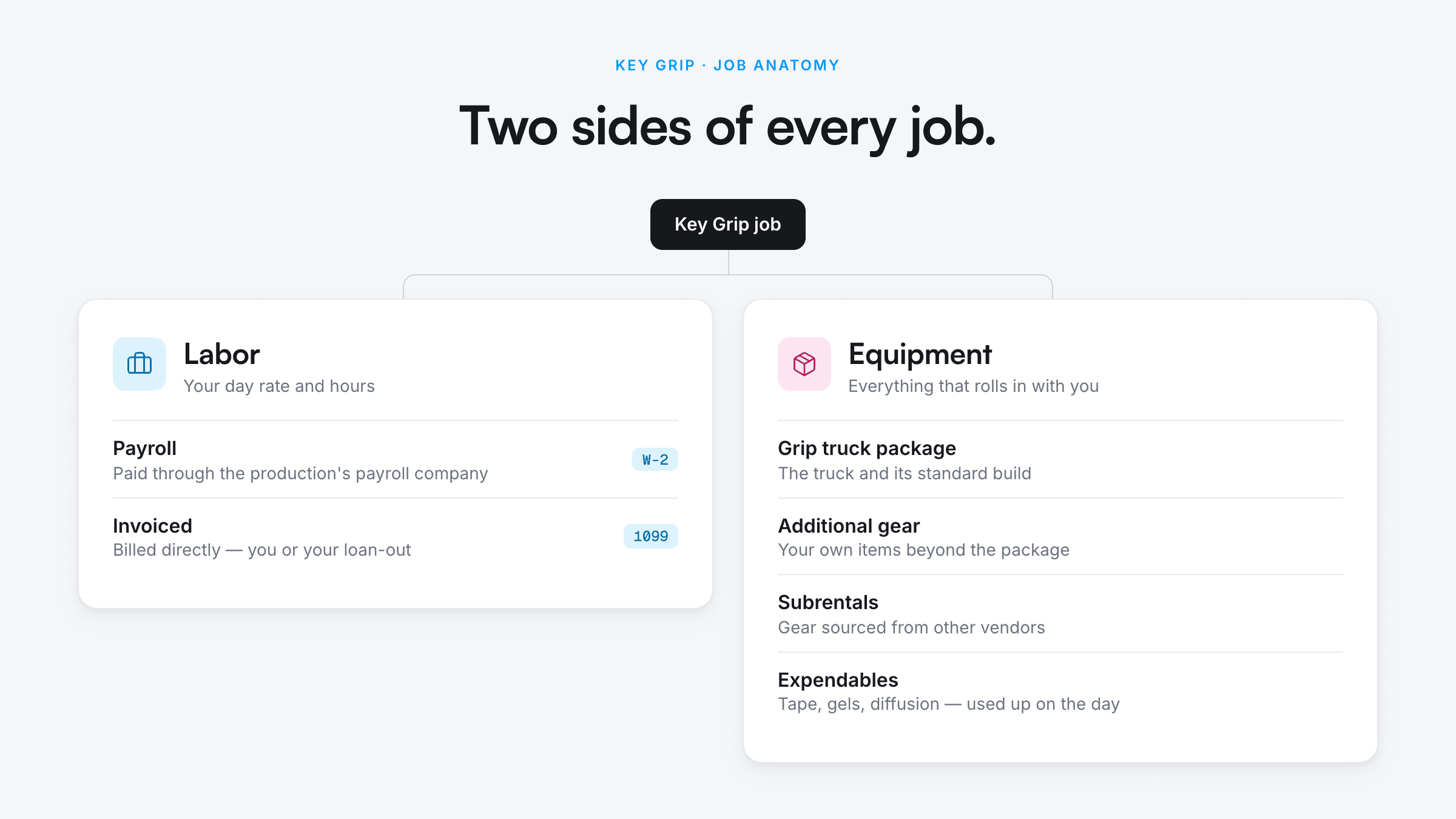
Now every job has two financial sides.
Your Labor
What you personally earned for working the job.
Your Equipment
What your equipment earned while it was working.
Those are not the same thing.
A $4,000 equipment invoice does not mean you made $4,000 on your equipment.
You may have had:
Subrentals
Expendables
Truck costs
Fuel
Repairs
Rental house expenses
Transportation
Other job-specific costs
If you want to understand what your gear is actually earning, you need to know what revenue and expenses belonged to each job.
Slater keeps your work and your gear connected to the jobs that generated the money.
A Better System Than Rebuilding Every Job From Scratch
Most Key Grips already have a system.
It might be:
Calendar + QuickBooks
Spreadsheet + Notes
Google Sheets + invoice templates
A folder full of PDFs
Or text messages you have not deleted because you know the original rate is buried somewhere in the thread.
Those systems can work.
Slater is for when you want the freelance workflow connected.
Hold → Confirm → Work → Add Actuals → Invoice
Your jobs, labor, gear, and career history stay together instead of being rebuilt every time production calls.
Free Resources for Key Grips
Day Rate Calculator
Negotiating a rate or checking an offer?
See what your day rate works out to per hour, with your overtime and double time rates.
Grip Package Lists
Building a grip package or checking your existing truck?
Browse example 3-ton, 5-ton, and 10-ton grip package lists.
Manage your jobs, gear, and invoices all in one place
Track your holds, hours, gear packages, subrentals, and invoices without bouncing between five different tools.
Key Grip FAQ
How do Key Grips get paid?
Key Grips may be paid through a production payroll company or asked to invoice production directly.
The arrangement depends on the production and the deal made before the job.
If the Key Grip also provides equipment, the equipment rental is often invoiced separately from labor.
Do Key Grips charge a day rate?
Yes.
Key Grip labor is commonly negotiated as a day rate or hourly rate with a guaranteed number of hours.
Weekly deals can also be negotiated, particularly for longer productions.
Rates vary substantially between commercials, television, features, low-budget productions, markets, union agreements, and individual Key Grips.
Do Key Grips charge separately for their grip truck?
Usually.
The Key Grip's labor and the equipment package are separate parts of the deal.
A truck package may be billed daily or under a negotiated multi-day or weekly arrangement.
What is a Key Grip box rental?
A box rental, sometimes called a kit rental, is payment from production for a crew member's personal tools or equipment.
A Key Grip supplying a full grip truck or large equipment package may negotiate the package itself instead of charging an additional box rental.
Do Key Grips invoice labor and gear together?
They can, but they do not have to.
In many situations, labor goes through payroll while equipment is invoiced separately.
Even when both are invoiced, separate labor and equipment invoices may make accounting easier for production.
Always follow the invoicing instructions provided by the production.
What is a subrental?
A subrental is equipment you rent from someone else so you can supply it to your production.
For example, a Key Grip may rent a slider, Max Menace, specialty rigging equipment, or additional textiles from another owner or rental house.
Production rents the equipment through you, while you are responsible for paying the vendor that supplied it.
Make sure any rental agreement allows the equipment to be subrented when required.
Should Key Grips track expendables?
Yes.
If materials or expendables are billable to production, record what was used while the job is happening.
Trying to reconstruct those costs weeks later makes it much easier to forget items or bill them incorrectly.
How does overtime work for a Key Grip?
It depends on the production, employment agreement, applicable union agreement, jurisdiction, and the deal you negotiated.
Confirm your rate and guarantee before the job and keep accurate in and out times.
Can Slater track both Key Grip labor and gear?
Yes.
A Slater job can keep your labor and equipment connected while still allowing you to handle billing based on how production is paying you.
A job might have:
Payroll labor and invoiced equipment
Invoiced labor only
Invoiced equipment only
Invoiced labor and equipment
You do not need to create separate versions of the same job just because the money is being handled differently.
Can I use Slater if I already use QuickBooks or Wave?
Yes.
Slater is designed around managing the freelance film job itself.
That includes:
Holds
Confirmed jobs
Labor
Gear packages
Actual work times
Job changes
Invoicing
You do not need to abandon every other financial tool you use just to keep your freelance work organized.
Your Grip Department Has a System. Your Freelance Career Should Too.
Keep your holds, jobs, labor, gear rentals, subrentals, and invoices connected from the first call through the final payment.